

Create Wholesale Orders
Learn how to order coffee products at wholesale pricing for your business or personal use
Wholesale orders let you purchase Roastify products at discounted bulk pricing. Whether you're stocking inventory for your Shopify store, selling at farmers markets, or just want to stock up for yourself, wholesale orders give you flexibility and great prices.
Why Place Wholesale Orders?
Stock Your Shopify Store
Purchase inventory that customers can buy through your Shopify store with faster shipping (you ship from your own location).
Local Sales
Sell at farmers markets, pop-up shops, or local retailers. Buy once, sell many times.
Sample Products
Get physical products to photograph for your marketing materials, website, and social media.
Personal Use
Enjoy your own coffee at wholesale prices! Order for your home or office.
You can order any of your published products at wholesale pricing. No minimum order quantities - order as few as 1 unit!
How to Place a Wholesale Order
Step 1: Start a New Order
Navigate to Orders in the main navigation
Click New Order or Start Wholesale Order
You'll see all your published products displayed as cards
Step 2: Select Products
Browse your products by scrolling through the grid
Click on any product card to see available variants
Select your options:
- Grind Type: Whole bean, drip, espresso, French press, etc.
- Quantity: How many units you want
Click Add to Cart to add to your order
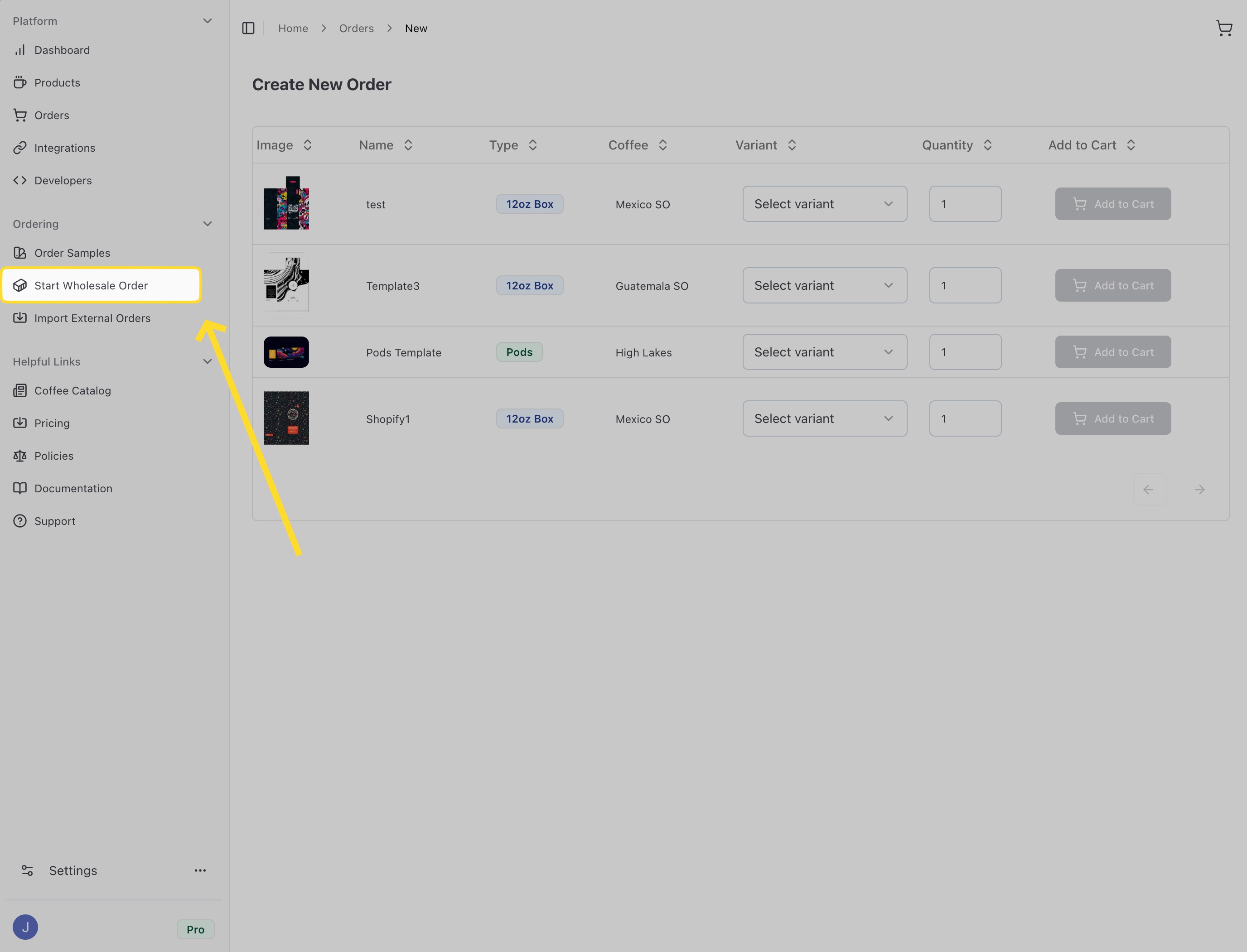
Use the filter tabs at the top to quickly find specific product types like 12oz Bags, Boxes, Pods, or Instant Coffee.
Step 3: Review Your Cart
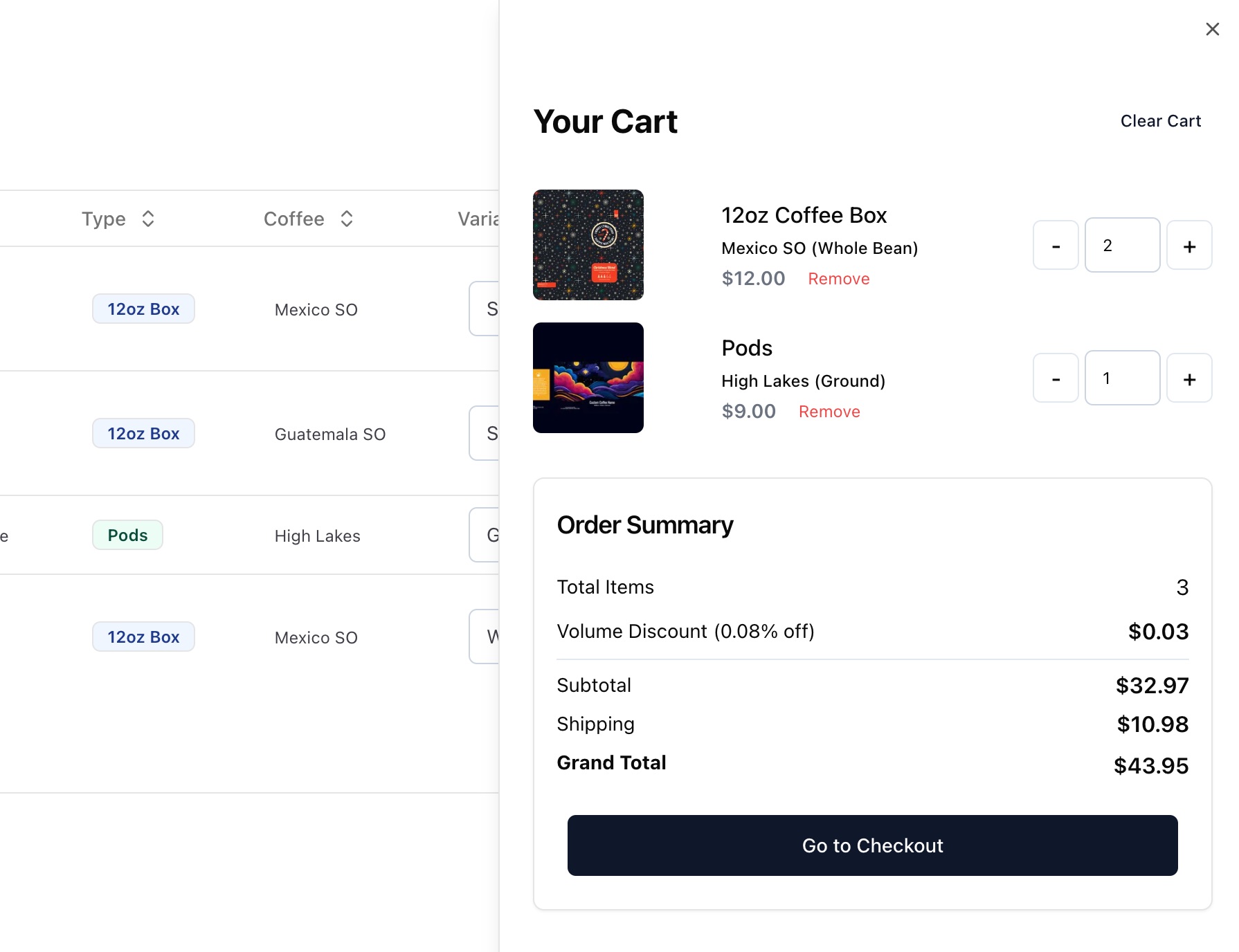
Click the cart icon (usually in the top right) to view your order
Review all items in your cart:
- Verify quantities are correct
- Check grind types are what you want
- Make sure you didn't miss anything
Adjust quantities by typing new numbers or using +/- buttons
Remove items you don't want by clicking the trash icon
Step 4: Add Shipping Address
Enter the address where you want your order delivered
Make sure the address is complete and accurate
Check shipping options and estimated delivery dates
Pro Plan members get 2-day shipping on all orders. Base Plan members receive standard shipping (5-7 business days).
Step 5: Complete Payment
Review your order total, including shipping
Select your payment method
Click Place Order or Complete Purchase
Your payment method on file will be charged. Make sure it's valid and has sufficient funds.
Step 6: Track Your Order
After placing your order:
You'll receive an order confirmation email
Your order appears in the Orders list
As it progresses, status updates automatically:
- Pending: Order received, waiting to process
- Processing: Being prepared for shipment
- Shipped: On the way to you (with tracking number)
- Delivered: Arrived at destination
Wholesale Pricing
One of the benefits of wholesale orders is our tiered pricing:
- Volume Discounts - Order more, pay less per unit! Larger quantities automatically unlock better rates.
- No Hidden Fees - What you see is what you pay. No setup fees, no minimums, no surprises.
The per-unit price decreases as you order more. Check the pricing shown in your cart to see your current discount level.
Shipping Information
Shipping Speed
| Plan | Shipping Speed |
|---|---|
| Free Trial | Standard (5-7 days) |
| Base | Standard (5-7 days) |
| Pro | Fast (2 days) |
Shipping Costs
Shipping costs are calculated based on:
- Order weight
- Shipping distance
- Selected shipping speed
Shipping costs are shown in your cart before you complete checkout.
Common Questions
Order Status Guide
| Status | Meaning |
|---|---|
| Pending | Order received, awaiting processing |
| Processing | Order is being picked, packed, and prepared |
| On Hold | Order paused, typically due to payment or inventory issues |
| Shipped | Order is in transit with the carrier |
| Delivered | Order was delivered to the address |
| Cancelled | Order was cancelled |
After Your Order Arrives
- Inspect Your Order: Check that all items arrived and are in good condition. Take photos of any damage.
- Save Tracking Info: Keep your tracking number in case you need to reference the shipment later.
If items are damaged or missing, contact support within 7 days of delivery with photos and order details.
Next Steps
View Order History
Learn how to track and manage all your orders. View Orders →
Import Orders
Need to fulfill orders from other platforms? Import Orders →
Manage Billing
Update payment methods and view transaction history. Billing →
You can purchase wholesale products from any of your saved products. All orders are fulfilled directly by Roastify with fast turnaround times.